Audio Properties Overview
This page gives a detailed overview of the audio properties that GameMaker supports and the different "levels" at which you can set/change them.
The table below lists all applicable levels for the basic audio properties, and lists the functions you can use to set and get each property at each level.
| Level | Gain | Pitch | Offset | Listener Mask |
|---|---|---|---|---|
| Asset | audio_sound_gain audio_sound_get_gain | audio_sound_pitch audio_sound_get_pitch | audio_sound_set_track_position audio_sound_get_track_position | N/A |
| Group | audio_group_set_gain audio_group_get_gain | N/A | N/A | N/A |
| Emitter | audio_emitter_gain audio_emitter_get_gain | audio_emitter_pitch audio_emitter_get_pitch | N/A | audio_emitter_set_listener_mask audio_emitter_get_listener_mask |
| Instance/Voice | audio_sound_gain audio_sound_get_gain audio_play_sound, etc. | audio_sound_pitch audio_sound_get_pitch audio_play_sound, etc. | audio_sound_set_track_position audio_sound_get_track_position audio_play_sound, etc. | audio_play_sound, etc. |
| Global/Listener | audio_master_gain audio_set_master_gain audio_get_master_gain | N/A | N/A | audio_set_listener_mask audio_get_listener_mask |
| Result | Gasset * Ggroup * Gemitter * Ginstance | Passet * Pemitter * Pinstance | Asset-level offset unless instance-level offset is passed to the audio_play_sound_* functions | Memitter & Minstance (bitwise AND, see Bitwise Operators) |
Notes
The default asset-level gain is the value of the "Volume" slider in The Sound Editor:
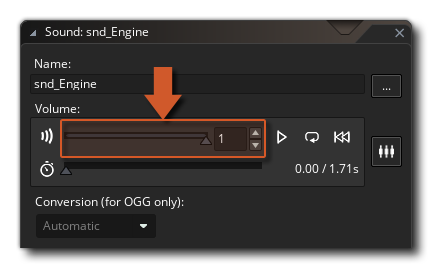
This can still be changed in-game later by calling audio_sound_gain with the sound asset ID as the argument:
audio_sound_gain(snd_Explode, 0, 0); // Set the asset-level gain to 0 (new instances of this sound play muted)